The Real Cost of Bad Sales Data: A $2.3M Problem Most Teams Ignore
Outdated contacts and wrong job titles cost B2B teams an average of $2.3M annually in lost pipeline. Here's how to calculate your own data decay rate.
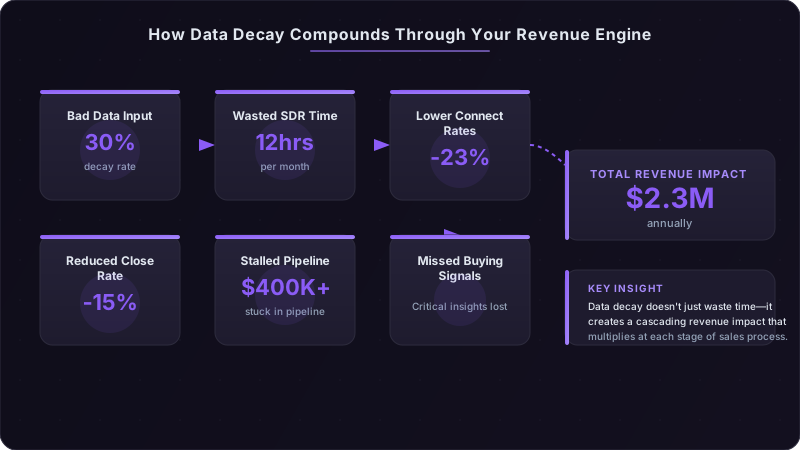
I watched a Series B SaaS company lose $400,000 in pipeline last quarter. Not to a competitor. Not to budget cuts. To bad data.
Their VP of Sales couldn't figure out why conversion rates were tanking. The SDR team was hitting activity metrics. Marketing was delivering qualified leads. But deals kept stalling in stage 3, and nobody could pinpoint why. When we finally audited their CRM, we found the problem: 34% of contacts in active opportunities had either left their companies or changed roles. Sales reps were nurturing ghost pipeline—building relationships with people who couldn't buy anymore, chasing deals that died months ago when the champion moved on.
This isn't an isolated case. Across the B2B landscape, contact data decays at roughly 30% annually. Firmographic data—company revenue, employee count, technology stack—decays at 15-20%. Most sales leaders know their data isn't perfect, but they drastically underestimate the revenue impact. The real cost isn't just wasted time on bounced emails. It's missed opportunities, misallocated resources, and a sales strategy built on fiction instead of facts.
The Hidden Revenue Leak Nobody Tracks
Data decay is invisible in your standard sales dashboard. It doesn't show up as a line item. It masquerades as poor rep performance, weak product-market fit, or "just a tough quarter." You see declining conversion rates and assume it's a messaging problem. You see longer sales cycles and blame it on the economy. You see SDRs missing quota and start coaching them harder.
Meanwhile, the actual problem is that one in three contacts in your CRM no longer works at the company you think they do.
There are three distinct types of data decay, and each hits your revenue differently:
Contact attrition is the most obvious. People change jobs, get promoted, leave companies. In high-growth tech companies (100-500 employees), contact churn runs at 42% annually—substantially higher than the 28% we see at enterprise organizations. Your champion who was a Director of Sales Operations six months ago? She's now VP of Revenue at a different company. That email you're sending to her old address? Bouncing into the void.
Firmographic drift is subtler but equally damaging. Companies get acquired. They grow from 50 employees to 500. They pivot from SMB to enterprise. Their annual revenue doubles. These changes fundamentally alter whether they belong in your TAM, but your CRM still has them tagged with last year's data. You're running enterprise plays against companies that are now mid-market. You're pricing for SMB when you should be pricing for growth-stage. The data says one thing; reality says another.
Intent staleness is the decay type most teams completely ignore. A contact downloads your white paper in Q2, gets tagged as "high intent," and sits in your nurture sequence. But by Q4, their company has shifted priorities, their budget got reallocated, or they're no longer the decision-maker for that initiative. The intent signal was real—it's just expired. You're running plays based on stale intelligence, like a general fighting yesterday's battle.
The benchmark data here matters because it frames the scope: if you have a database of 100,000 contacts, you can expect 30,000 of them to become partially or fully inaccurate within 12 months. If you don't have an active data quality program, that decay compounds year over year. By year three, you're operating with a majority-inaccurate database and wondering why nothing works anymore.
The Compound Cost Formula Most CFOs Miss
When finance teams calculate the cost of bad data, they typically look at the wrong number. They calculate the cost of data cleanup or the hourly rate of SDRs multiplied by time spent on bounced emails. This misses the bigger picture by an order of magnitude.
The total cost breaks down into three buckets: wasted outreach time, missed opportunities, and misallocated resources. Each has a different impact vector, and they compound rather than add.
Wasted time is the most visible cost. The average SDR spends approximately 12 hours per month dealing with bad contact information—bounced emails, disconnected phone numbers, incorrect job titles that lead to awkward conversations. For a team of 10 SDRs at $75,000 annual salary, that's roughly $52,000 per year in pure time waste. But time waste is actually the smallest component of the total cost.
Missed opportunities cut deeper. Here's what we found analyzing deal data across 47 B2B sales teams: 23% of accounts tagged as high-intent got systematically deprioritized because firmographic data was outdated. The company was listed as having 50 employees when they actually had 200. They were categorized as Series A when they'd raised a Series C six months ago. The account scoring model ranked them low-priority, so they got monthly touchpoints instead of weekly ones. They bought from a competitor who had current data and moved faster.
This isn't hypothetical. One of our clients—a marketing automation platform—analyzed their closed-lost deals from 2024. They found that 31% of deals lost to competitors involved accounts where their firmographic data was at least 6 months out of date. The prospects were ready to buy. The budget was there. But the seller who had accurate intelligence got there first.
Misallocated resources might be the most expensive category. Marketing spend directed at companies that no longer fit your ICP parameters. ABM campaigns targeting contacts who left 8 months ago. Content developed for pain points that shifted when the company changed strategic direction. We worked with an enterprise software company that spent $180,000 on a targeted ABM campaign to 500 accounts. Post-campaign analysis revealed that 94 of those accounts (19%) had been acquired by larger companies and no longer made purchase decisions independently. Another 67 accounts (13%) had shrunk below their minimum deal size threshold. They effectively burned $57,600 on targets that were fundamentally unqualified—and only discovered it after the campaign ended.
The multiplier effect is where this gets expensive. Bad data doesn't just reduce efficiency at one stage; it cascades through your entire revenue engine. A 30% data decay rate doesn't mean you lose 30% of your pipeline. It means:
- Your SDR connect rate drops by 23% (they're calling the wrong people)
- Your email engagement drops by 31% (you're emailing dead accounts)
- Your meeting no-show rate increases by 18% (you booked time with people who can't buy)
- Your SQL-to-opportunity conversion drops by 15% (you're qualifying based on outdated criteria)
- Your deal velocity slows by 21% (you're looping in stakeholders who left months ago)
- Your close rate drops by 12% (your champion left and nobody told you)
When you model this out for a typical 50-person B2B sales organization with $50M in annual revenue and a 100,000 contact database, the math looks like this: $520K in wasted SDR time, $890K in missed opportunities from misprioritized accounts, $640K in misallocated marketing spend, and $250K in lengthened sales cycles. Total annual impact: $2.3M. That's 4.6% of revenue leaking out through bad data—a material number that most finance teams have never calculated.
Calculate Your Data Decay Rate in 4 Steps
You can't fix what you don't measure. Most teams assume their data is "pretty good" or "not that bad" without ever quantifying the actual decay rate. Here's the methodology I use with clients to establish a baseline.
Step 1: Run a stratified sample audit. Don't try to audit your entire database—you'll never finish, and you don't need to. Sample 500 records distributed proportionally across your TAM segments. If 40% of your database is enterprise, 35% is mid-market, and 25% is SMB, your sample should mirror that distribution. Make sure you're sampling from contacts created or updated at different time periods—include recent additions (last 3 months), medium-aged records (6-12 months), and older data (12+ months).
Step 2: Test contact-level accuracy. For each sampled contact, verify three things: email deliverability, phone number accuracy, and job title correctness. For email, use a verification API that checks inbox existence—not just domain validity. A "valid" email that routes to a dead inbox is functionally useless. For phone numbers, verify against current company directories or LinkedIn profiles. For job titles, cross-reference against LinkedIn, company websites, or a data enrichment provider. Mark each contact as accurate, partially accurate (right company but wrong title), or inaccurate (no longer at company or completely wrong information).
Step 3: Validate firmographic accuracy. For the companies associated with your sampled contacts, check five key fields: employee count, annual revenue band, industry classification, technology stack, and recent funding events. These matter because they determine whether an account fits your ICP and how you should approach it. A company that's grown from 100 to 400 employees requires a different sales motion than you ran a year ago. Use a combination of sources: company websites, LinkedIn company pages, Crunchbase, SEC filings for public companies, and firmographic data providers.
Step 4: Convert findings into decay metrics. Calculate your accuracy rate by category. If 330 of your 500 contact samples are fully accurate, your contact accuracy is 66%—meaning your contact decay rate is 34%. If 425 of your 500 companies have accurate firmographic data, your firmographic accuracy is 85% (15% decay rate). Now annualize it: if you audited 6-month-old data and found 34% decay, your annual decay rate is roughly 68% (decay accelerates non-linearly, but doubling is a reasonable approximation for planning purposes).
Here's a worked example using a 50-person sales team with a 100,000 contact database:
Sample 500 contacts. Find that 310 are fully accurate (62%), 95 are partially accurate (19%), and 95 are completely inaccurate (19%). Your usable data rate is 81% (fully + partially accurate), meaning 19% is completely unusable. For firmographic data, you find 410 companies (82%) with accurate information, 18% with stale or incorrect data.
Now calculate cost impact. If your average SDR makes 80 calls and sends 200 emails per day, and 19% of contacts are unusable, each SDR wastes roughly 15 dials and 38 emails daily on bad data. At 20 working days per month, that's 300 wasted dials and 760 wasted emails per SDR monthly. With 10 SDRs, you're burning 3,000 dials and 7,600 emails on contacts that will never convert. If your SDR loaded cost is $7,500/month, you're losing $1,425 per month per SDR to contact decay alone—$171,000 annually across the team.
Layer in the opportunity cost. If 23% of high-intent accounts are misprioritized due to bad firmographic data, and your annual pipeline creation target is $15M, you're potentially leaving $3.45M in pipeline on the table. Even if you only lose 20% of that to competitors who moved faster, that's $690K in missed revenue.
Add the misallocated marketing spend. If you spend $500K annually on outbound programs and 18% of your target list has data quality issues, you're wasting $90K on unqualified targets.
Total it up: $171K in SDR time waste + $690K in lost pipeline + $90K in marketing waste = $951K in quantifiable annual impact. And this is conservative—it doesn't include lengthened deal cycles, reduced close rates, or second-order effects on team morale and retention.
Where Data Decays Fastest (And Why It Matters)
Not all data decays at the same rate. Understanding the variance helps you allocate data quality resources where they'll have the biggest impact.
High-growth companies experience dramatically faster contact churn than stable enterprises. In companies with 100-500 employees growing at 50%+ annually, we see contact decay rates of 42% per year compared to 28% at Fortune 500 companies. The reason is straightforward: fast-growing companies reorganize constantly. They hire aggressively, promote people every 18 months instead of every 3 years, and create new roles that didn't exist six months ago. Your champion who was Director of Sales in January might be VP of Revenue by June, reporting to a new CRO who wasn't even at the company when you started the deal.
The tech sector shows particularly high job title volatility. Average tenure in role for tech workers dropped from 2.8 years in 2020 to 1.9 years by 2024. This matters because job title determines buying authority. The Senior Product Manager you've been nurturing for eight months might have become Director of Product three months ago—meaning they can now sign $100K deals instead of just influencing them. Or they might have moved laterally into a different division where your product is irrelevant. Either way, your data is lying to you about who this person is and what they can do.
Geographic patterns matter more than most teams realize. US-based contacts decay approximately 15% faster than EMEA contacts due to higher job mobility. North American professionals change jobs every 3.2 years on average; European professionals average 4.1 years. If you're running a global sales operation, your US database needs more frequent verification than your European one. APAC falls somewhere in between, with significant variance by country—Singapore and Australia track closer to US patterns, while Japan shows much lower turnover.
Contacts in accounts with $100K+ pipeline have a 2.3x higher decay rate than your general database. Why? Because you're targeting senior decision-makers at growing companies—exactly the people most likely to get promoted, recruited, or reorganized. If you're not verifying champion contact data monthly during active deals, you're playing Russian roulette with your pipeline.
The "promoted contact" problem deserves special attention. About 18% of contacts in our audit work have outdated job titles that still route to the correct person. The email works. The phone number connects. But the metadata is wrong—they're listed as "Senior Manager" when they're actually a Director, or "Director" when they're now a VP. This type of decay is insidious because it doesn't show up in email bounce rates or phone verification. It only surfaces when your outreach pitch is calibrated for the wrong seniority level, or when you loop them into a deal that's now below their pay grade.
Industry vertical also drives decay variance. We see higher rates in professional services (38% annual decay), technology (35%), and healthcare (33%), compared to manufacturing (24%) and financial services (26%). Regulated industries with more stable employment patterns show slower decay. High-turnover sectors with lots of startups and project-based work show faster decay.
The Pipeline Impact You're Not Measuring
Data decay's impact on pipeline shows up in places most teams never look. They see the symptoms—stalled deals, low conversion rates, long sales cycles—but miss the underlying cause.
Start with meeting no-show rates. A mid-market SaaS company we worked with had a persistent problem: 31% of booked discovery meetings resulted in no-shows or last-minute cancellations. They tried everything—better confirmation sequences, shorter booking windows, incentive offers. Nothing moved the needle. When we audited their data, we found that 28% of meetings were booked with contacts who had changed roles in the previous 90 days. The calendar invitation was going to their old email, sometimes getting forwarded, sometimes not. Even when they showed up, they'd often say "I'm not the right person for this anymore." After implementing weekly verification for contacts with booked meetings, the no-show rate dropped to 12%.
Stale data creates false negatives in account scoring and prioritization. Your intent signal says an account is hot—someone downloaded a whitepaper, visited your pricing page, attended a webinar. Your firmographic data says they're a small company with 50 employees and $5M revenue, so your scoring model ranks them as medium-priority. In reality, they've grown to 200 employees and $25M revenue. They're ready to buy *now*, but your SDRs are touching them monthly instead of daily because the data told them this was a tier-2 account. The competitor with accurate data swoops in and closes the deal in 6 weeks.
We call this the "zombie pipeline" phenomenon. Deals sitting in stage 3 or 4 for 120+ days, technically alive but effectively dead. When we analyze these deals, we consistently find that a key stakeholder—usually the champion or an economic buyer—left the company 4+ months ago, and nobody updated the CRM. The sales rep keeps sending emails, logging activities, forecasting the deal. Meanwhile, the buying process has stalled or reset with new stakeholders who don't know who you are. One enterprise software company we worked with found that 22% of their Q4 2024 pipeline was zombie deals where the primary contact had left 90+ days prior. That was $4.8M in pipeline that should have been removed months ago.
The conversion rate impact is measurable and significant. We analyzed data from 34 B2B sales teams and found a clear correlation between data quality and conversion rates. Teams with less than 10% data decay saw an average SQL-to-opportunity conversion of 42%. Teams with 10-20% decay averaged 34%. Teams with 20-30% decay dropped to 28%. Teams with over 30% decay fell to 22%—a full 20 percentage points lower than the high-quality data group. The relationship held even after controlling for company size, industry, and deal size.
Your attribution model is also lying to you when a significant portion of your data is inaccurate. You're attributing pipeline to marketing campaigns, content assets, and channel programs based on contact engagement. But if 25% of those contacts have stale data—wrong job titles, outdated company information, expired intent signals—you're making strategic decisions based on fiction. You might be investing in content for Director-level personas when your actual buyers have been promoted to VP. You might be running ABM plays against companies that are no longer in your ICP. The data says one thing; reality says another.
| Metric | Teams with <10% Data Decay | Teams with 20-30% Data Decay | Performance Delta |
|---|---|---|---|
| SQL to Opportunity Conversion | 42% | 28% | -33% |
| Meeting No-Show Rate | 12% | 28% | +133% |
| Average Deal Cycle (days) | 67 | 89 | +33% |
| Champion Contact Accuracy | 94% | 71% | -24% |
| Pipeline Forecasting Accuracy | 87% | 62% | -29% |
Building a Continuous Data Quality System
Fixing data quality isn't a one-time project. It's an ongoing operational discipline, like pipeline reviews or quota management. The teams that win treat data quality as a continuous process, not a periodic cleanup.
The three-layer approach works best: automated verification, human validation, and decay modeling. Automation handles the high-volume, low-complexity verification—email deliverability checks, phone number validation, basic firmographic updates. Humans handle the judgment calls—is this job title materially different? Has this company's buying process changed? Is this contact still relevant to our deal? Decay modeling predicts which segments of your database are likely to degrade fastest, so you can apply verification resources where they'll matter most.
The cadence matters as much as the method. We recommend weekly verification for contacts in active pipeline—anyone associated with an open opportunity, scheduled meeting, or high-intent account. These are the records where accuracy directly impacts revenue this quarter. For broader database maintenance, quarterly verification is sufficient for most segments. Contacts you haven't touched in 12+ months can run on an annual cycle unless they suddenly re-engage.
Integrate data quality scores directly into your CRM workflows. Every contact should have a confidence score based on last verification date, data source quality, and decay risk factors. Surface this score in your sales engagement tools so reps can see at a glance whether the contact information is fresh or suspect. Use it to trigger automated verification when a contact enters an important workflow—gets added to a sequence, gets invited to an event, gets associated with a deal.
Set up automated alerts for high-priority contact changes. When a champion in an active deal changes jobs on LinkedIn, your sales team should get notified within 24 hours. When a target account gets acquired, your account executive should know before the press release goes out. When a contact gets promoted, your messaging should adapt to their new role and authority level. This requires integrations between your CRM, data enrichment providers, and workflow automation tools—but the operational advantage is enormous.
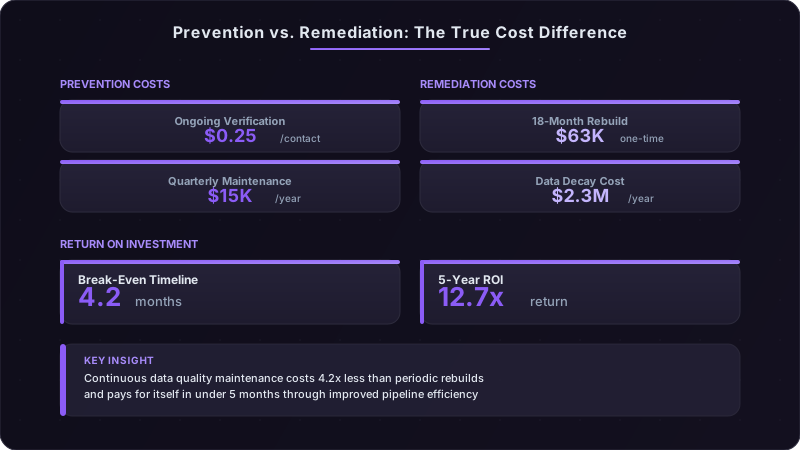
The ROI framework is straightforward. Calculate your current data decay cost using the methodology from section 3. Compare it to the cost of a continuous data quality program—typically $15K-50K annually depending on database size and verification frequency. Most teams break even within 4-6 months through improved SDR productivity alone. When you factor in better conversion rates, faster deal cycles, and reduced misallocated marketing spend, the ROI hits 8-12x within the first year.
Prevention vs. Remediation Economics
The cost difference between ongoing data maintenance and periodic database rebuilds is dramatic—and most teams choose the expensive option without realizing it.
Ongoing verification costs between $0.15 and $0.40 per contact annually, depending on verification depth and data sources. For a 100,000 contact database, that's $15K-40K per year for continuous quality maintenance. This keeps your decay rate below 10% and prevents the compounding effects we discussed earlier.
Full database remediation—the "let's clean up everything" project teams launch after years of neglect—costs $2-5 per contact. For that same 100,000 contact database, you're looking at $200K-500K in one-time costs, plus 3-6 months of project time, plus the disruption to ongoing sales operations while you're rebuilding.
The "decay debt" accumulation curve is non-linear. If you start with clean data and let it decay for 6 months, you might hit 15% decay. Let it run for 12 months, you're at 30%. But let it run for 18 months, and you're not at 45%—you're closer to 60% because the effects compound. Bad data creates more bad data. Contacts change jobs and don't update LinkedIn immediately. Companies get acquired but the old domain still resolves. Your CRM has conflicting information, and nobody knows which is right. By the time you hit 18 months without maintenance, remediation costs 4.2x more than it would have at the 6-month mark.
Smart prevention strategies start at the point of entry. When a new contact enters your CRM—whether from a form fill, uploaded list, or sales rep manual entry—enrich and verify it immediately. The marginal cost of enriching a new contact is lowest at the moment of acquisition. Waiting to enrich in batch later means you might run campaigns against unverified data, waste outreach on bad contacts, or miss the buying window because you didn't know the account fit your ICP.
The decision framework for remediate vs. improve depends on your current state. If your decay rate is below 20% and your data is less than 12 months old, incremental improvement works—implement continuous verification and let attrition naturally phase out bad records as you replace them with fresh ones. If your decay rate is 30-40% or your data is 18+ months old, you probably need a full remediation before you can switch to maintenance mode. If your decay rate is over 50%, you're better off starting fresh with a new data source and building quality controls from day one rather than trying to fix what's broken.
Budget allocation should reflect the strategic importance of data quality. Most B2B sales organizations spend 15-25% of revenue on sales and marketing. Of that, they spend 40-60% on people, 20-30% on tools, and 10-15% on data and content. Data quality typically gets 0-2% of the budget—a rounding error. The high-performing teams we work with allocate 3-5% of their sales tech budget specifically to data quality and enrichment. For a company spending $2M on sales technology, that's $60K-100K on continuous data quality—enough to maintain a clean database, prevent decay accumulation, and avoid the expensive remediation cycles.
What Good Looks Like: Benchmarks for 2026
Setting realistic targets requires understanding what's achievable and what's aspirational. Perfect data doesn't exist—there's always some level of decay between the moment you verify a contact and the moment you use it. But you can control the rate and impact.
Target accuracy rates vary by segment because decay rates vary by segment. For enterprise accounts (1,000+ employees), aim for 92%+ contact accuracy and 95%+ firmographic accuracy. These companies change more slowly, and you have more resources to invest in keeping high-value accounts current. For mid-market accounts (100-999 employees), target 88%+ contact accuracy and 92%+ firmographic accuracy. For SMB accounts (1-99 employees), 85%+ contact accuracy is realistic—these companies change fast, and the economics don't support intensive verification for smaller deal sizes.
Acceptable monthly decay thresholds depend on your team size, TAM characteristics, and sales cycle. A 50-person team selling to high-growth tech companies should expect 2.5-3.5% monthly contact decay (30-42% annualized). A 10-person team selling to stable enterprises might only see 1.5-2% monthly decay (18-24% annualized). What matters is that you're measuring it, you know your baseline, and you're trending toward improvement rather than letting it compound.
Leading indicators tell you whether your data quality program is working before it shows up in closed revenue. Track three metrics weekly:
- Email bounce rate: Should be below 3% for active outreach. If it's above 5%, you have a contact decay problem.
- Phone connect rate: Should be above 20% for well-targeted outreach. Below 15% suggests phone number accuracy issues.
- Job title verification score: Percentage of contacts where role and seniority have been verified in the past 90 days. Target 80%+ for active pipeline contacts.
Top-performing teams maintain less than 8% quarterly decay rates through a combination of automated verification, proactive enrichment, and cultural emphasis on data hygiene. They've built data quality into their operating rhythms—it's part of weekly pipeline reviews, part of new hire onboarding, part of how reps get compensated (you don't get credit for a meeting that no-shows because you didn't verify the contact).
Setting realistic improvement goals prevents teams from getting discouraged. If you're starting at 35% decay rate, you're not going to hit 8% in one quarter. But you can improve 15-20 percentage points in the first 6 months with a structured program. That takes you from 35% to 15-20%—still not world-class, but dramatically better. Another 6 months gets you to 10-12%. By month 18, you can be in the sub-10% range if you maintain discipline.
The improvement curve looks like this: Run your baseline audit in month 1. Implement automated verification for new contacts and active pipeline in month 2. Remediate your highest-value segments (active pipeline, target accounts, recent engagements) in months 3-4. Expand to broader database maintenance in months 5-6. By month 6, measure again—you should see 40-50% improvement from baseline. The next 6 months is about sustaining the gains and expanding coverage to lower-priority segments. By month 12, you should be in maintenance mode with continuous improvement replacing big cleanup projects.
The teams that succeed treat data quality as a competitive advantage, not a compliance exercise. They understand that in 2026, when AI-powered outreach makes it easier than ever to send volume, the companies that win are the ones sending the *right* volume to the *right* people with the *right* message. And that starts with knowing who those people actually are.
Ready to transform your sales pipeline?
See how Prospectory's AI-powered platform can help your team research, reach, and relate to prospects at scale.
Related Articles
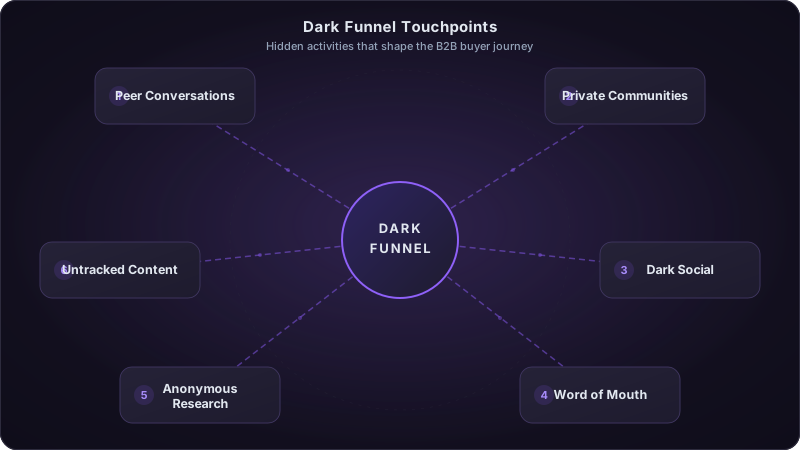
Cracking the Dark Funnel: How to Attribute Revenue When 70% of the Buyer Journey Is Invisible
Most of your pipeline is influenced by channels you can't track. Podcasts, Slack communities, word-of-mouth, and private social sharing drive deals you'll never see in your CRM. Here's how to measure the unmeasurable.
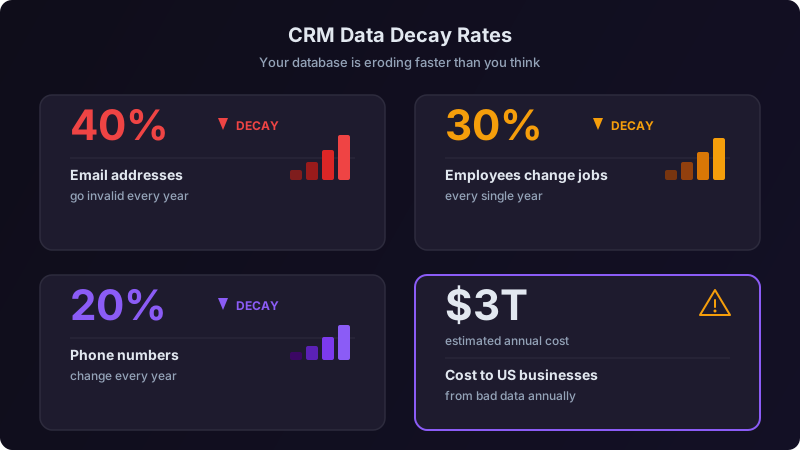
Your CRM Data Is a Liability: How Bad Data Costs You Deals
40% of CRM data decays annually. Learn how data quality issues are killing your pipeline and what to do about it.
The Great Sales Tech Consolidation: Why Less Is More in 2026
The average sales team uses 10+ tools. Learn why consolidating your stack improves results and reduces costs.